In plain terms, AI in technical writing refers to using AI-powered tools to support documentation tasks, such as drafting, editing, structuring, reviewing, and maintaining content. These tools can save time, surface gaps, and reduce manual effort. They can also introduce real risks if used carelessly. This guide brings everything together in one place. You will learn what AI actually does well, where it struggles, how writers are using it in real workflows, and what skills matter next. By the end, you should have clarity, not hype, and a practical sense of how to start (or course-correct).
AI is already changing how technical writing work gets done. Not by replacing writers wholesale, but by reshaping how we research, draft, review, and maintain documentation. Regardless of your industry, domain, or type of technical writing, AI is no longer optional background noise. It is part of everyday workflows, whether formally adopted or quietly used on the side.
Table of Contents
What is AI in technical writing?
AI in technical writing is best understood as augmented writing, not automated documentation. The tools do not “know” your product, your users, or your risks. You’re still the “writer”. AI tools generate language based on patterns learned from large datasets. Your judgment still matters. By the way, this isn’t your first experience with “AI” tools.
Spellcheck to Large Language Models (LLMs)
Technical writers have used automation for decades. Spellcheckers, grammar tools, and style validators were early forms of assistance. Who here remembers Microsoft Word’s buggy and almost useless grammar check? The shift since 2022 has been the rise of LLMs (Large Language Models), such as ChatGPT, Claude, and Gemini.
These models can:
- Generate draft content from prompts
- Rewrite text for different audiences
- Summarize long documents
- Identify inconsistencies or missing sections
What changed is accessibility. You no longer need specialized tooling or scripting. A browser-based interface is enough. Many teams now treat AI as part of their core documentation toolkit, supported by practical strategies for better technical content.
Where does AI fit in the documentation lifecycle?
AI shows up across the docs lifecycle (DDLC), but unevenly.
- Planning: outlining sections, brainstorming edge cases
- Drafting: first drafts, examples, alternate phrasings
- Editing: clarity checks, tone adjustments, style enforcement
- Publishing: metadata suggestions, summaries, release notes
- Maintenance: change impact analysis, version comparisons
AI works best where patterns are stable and risk is low. It struggles where accuracy, context, and judgment are critical. If you aren’t familiar with documentation lifecycle (DDLC), then see What is DDLC?
Core AI use cases across the docs workflow
AI is most useful when applied surgically. Below are the main use cases, grounded in real documentation tasks.
Research and information gathering
Got a pile of meeting notes, emails, and discussion threads to go through? AI can speed up early-stage research, especially when you are unfamiliar with a domain. For example, if you are documenting a new API feature and need a high-level understanding before meeting the developers. You can ask the AI to:
- Draw insights from all your research materials
- Summarize public standards, protocols, and requirements documents
- Generate clarifying questions for SMEs (subject matter experts)
- List common edge cases or failure modes
However, know that you cannot yet use AI to:
- Replace SME validation
- Confirm product-specific behavior
Treat AI as a research assistant, not a source of truth.
Drafting and rewriting
Drafting is where most writers feel the time savings. Imagine you are writing onboarding docs for two audiences, internal support teams and external developers. AI can help you:
- Create two versions from one source
- Adjust tone and terminology
- Simplify language for non-expert readers
Editing, QA, and style enforcement
AI excels at pattern-based review.
Common uses:
- Flagging long or complex sentences
- Checking for inconsistent terminology
- Enforcing style guide rules
However, AI does not understand why a deviation exists. You, my dear human fellow-writer, still decide whether the rule applies.
Structuring and metadata
Structuring is often overlooked but high impact. Even at a document level, you as a technical writer can use AI to:
- Identify logical section ordering to improve navigation
- Generate summaries and abstracts
- Propose headings aligned with user intent
Real task: Turning a raw engineering note into a publishable doc outline. This is low-risk and high-leverage.
Localization and accessibility
AI-assisted localization is improving fast, but it requires guardrails.
Good uses:
- First-pass translations
- Simplifying complex language
- Generating alt text and accessibility hints
High-risk areas:
- Legal or safety-critical content
- Nuanced terminology
Essential AI tools for technical writers
Not all AI tools are built equal. Each tool can roughly categorized into:
- General purpose LLM
- Documentation-specific platform
- IDE (integrated development environment) and code-adjacent tool
- Evaluation and QA tool
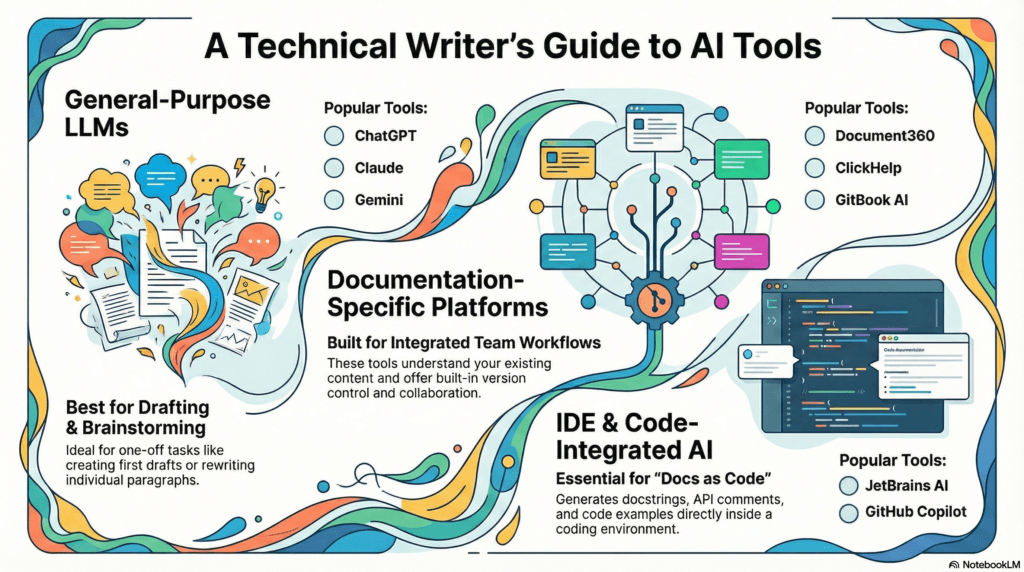
Understanding these categories matters more than brand names. Let’s look at each category, a few example tools, strengths, and limitations.
General-purpose LLMs (typical chatty Cathys)
Examples: ChatGPT, Claude, Gemini
Best for:
- Drafting and rewriting
- Brainstorming and outlining
- Prompt-based experimentation
Limitations:
- No product awareness
- Risk of hallucinations
- Data sensitivity concerns
These tools are flexible, but context is fragile. These come with a free plan, but tokens are very limited. Unless you are one of the few technical writers blessed with a paid plan, this can be frustrating. I myself run out of free “tokens” in ChatGPT before my “conversation” is completed.
Documentation-specific platforms (generate docs from code)
Examples: Document360, ClickHelp, GitBook AI
Best for:
- Context-aware suggestions
- Integration with docs workflows
- Version-controlled content
Limitations:
- Cost
- Platform lock-in
- Less flexible prompting
Many teams evaluate these platforms using roundups of AI tools for technical writing before committing.
IDE and code-adjacent tools (your vibe coding specialists)
Examples: GitHub, Copilot, JetBrains AI
Best for:
- Code explanation
- Inline documentation
- API reference assistance
They shine when docs and code live close together.
Evaluation and QA tools (vibe check)
Examples: Hemingway, Grammarly, readability checkers
Best for:
- Clarity and readability checks
- Passive voice detection
- Complexity scoring
They are narrow, but reliable.
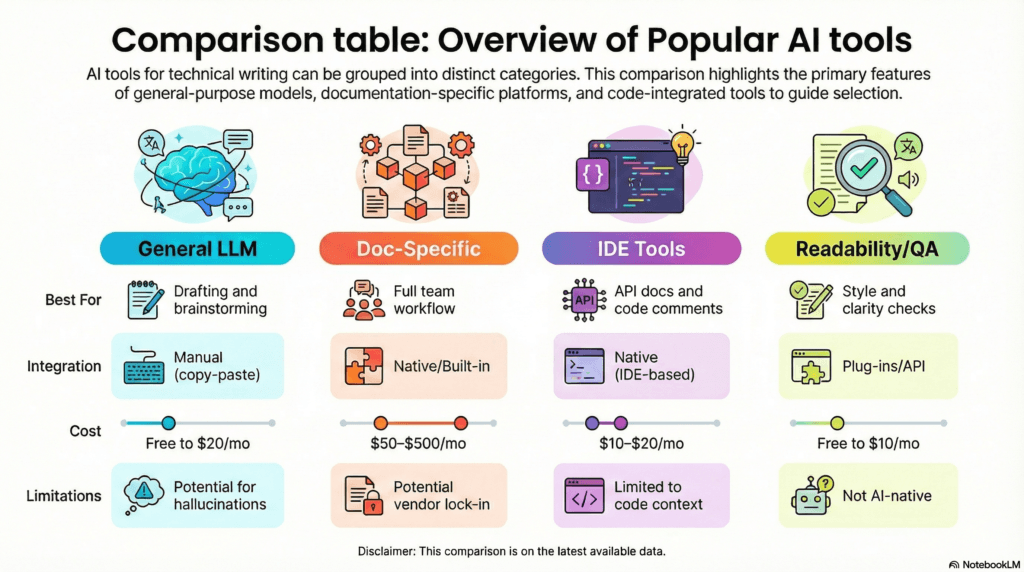
Comparison table: AI tools overview
How AI is changing the technical writer’s role
Many writers worry about job security. They fear that AI will replace them. That concern is understandable. AI may replace some writers, initially at least as organizations race to adapt AI, it will likely transform how writers work. The reality is more nuanced, as seen in how AI is reshaping technical writing roles and required skills.
The AI revolution is pretty much like every other work or productivity-based revolution we have seen before. Look at how we evolved in the way we work in the past century. The agricultural revolution saw manual plowing replaced by tractors. The industrial revolution saw factory workers replaced by machines. The digital revolution saw manual typing and accounting roles replaced by computers. History demonstrates that these shifts changed the nature of the role without eliminating the need for human expertise. AI represents a similar evolution in technical communication, where the focus moves from the manual labor of drafting to the strategic management of automated systems. You, as a technical writer, will thrive by becoming a proficient operator of these AI systems, much like the successful workers in previous eras who mastered the machinery of their time.
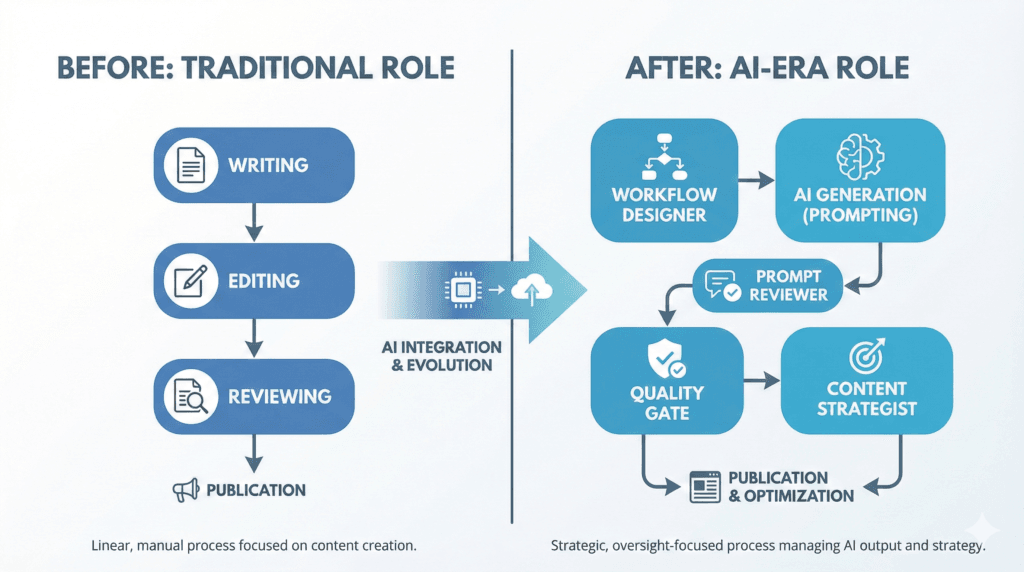
From writer to AI content director
Writers are increasingly:
- Designing workflows
- Defining quality thresholds
- Reviewing AI output
You spend less time typing sentences and more time directing systems.
New skills that matter
Over the next 12–24 months, three skill areas stand out:
- Prompt engineering: Asking precise, testable questions
- System thinking: Understanding workflows end-to-end
- Metrics: Measuring doc quality beyond word count
Many writers are actively updating their technical writing skills with AI to stay relevant. If you’re concerned about job security, mastering the above skills is a good way to cement your position. It may even guarantee quick growth!
Collaboration with developers, PMs, and AI systems
AI becomes another stakeholder.
Real workflow:
A writer drafts, AI rewrites, SME reviews, writer validates, system publishes.
You remain the quality gate.
Risks, limitations, and ethics of AI in technical writing and documentation
Ignoring risks is how teams get burned. You have likely seen a little disclaimer in your favorite AI tool that reads something like: ABC can make mistakes, so double-check it. Current AI tools are designed to always keep the conversation going, so they tend to hallucinate, and this poses a huge risk.
Hallucinations and accuracy risks
AI can fabricate:
- Features
- Parameters
- Behaviors
This is not a bug. It is a known limitation, commonly referred to as AI hallucination, and well-documented in overviews of how and why AI hallucinates. For example, it can make up figures if asked to generate statistical data. Every time I use AI to research a topic, I manually verify each link it cites as it can include internal artifacts within links or present incorrectly formatted ones. Always validate AI-generated content against source systems.
Bias, security, and confidentiality
Risks include:
- Training data bias
- Leaking proprietary information
- Storing sensitive prompts
Assume anything pasted into public tools may persist. Always review your organization’s AI policy carefully before you use any AI tool. As a rule, I only use AI tools permitted by my organization at work. To be safer still, I get my manager’s written consent before using any AI tool. Your organization, and the world by extension, is still getting used to AI in the workplace, policies will change frequently.
Copyright, attribution, and transparency
Open questions remain:
- Who owns AI-generated content?
- When should AI use be disclosed?
Policies vary by organization.
Practical guardrails for docs teams
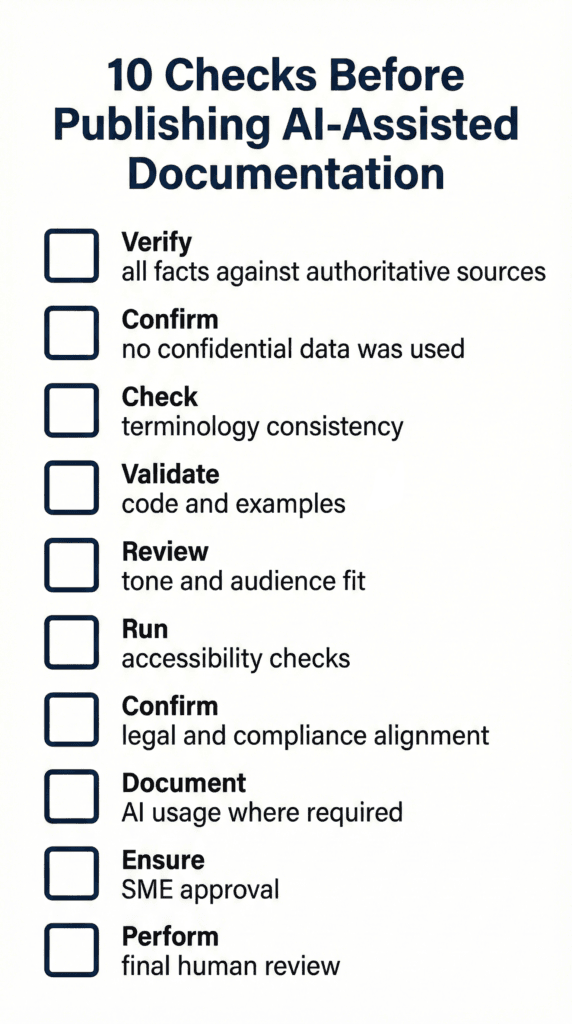
Checklist: 10 Checks Before Publishing AI-Assisted Documentation
Use the following checklist as a basic guardrail to use when relying on AI tools, or publishing AI-generated content. These basic checks will protect you and your team from accidentally misusing AI tools.
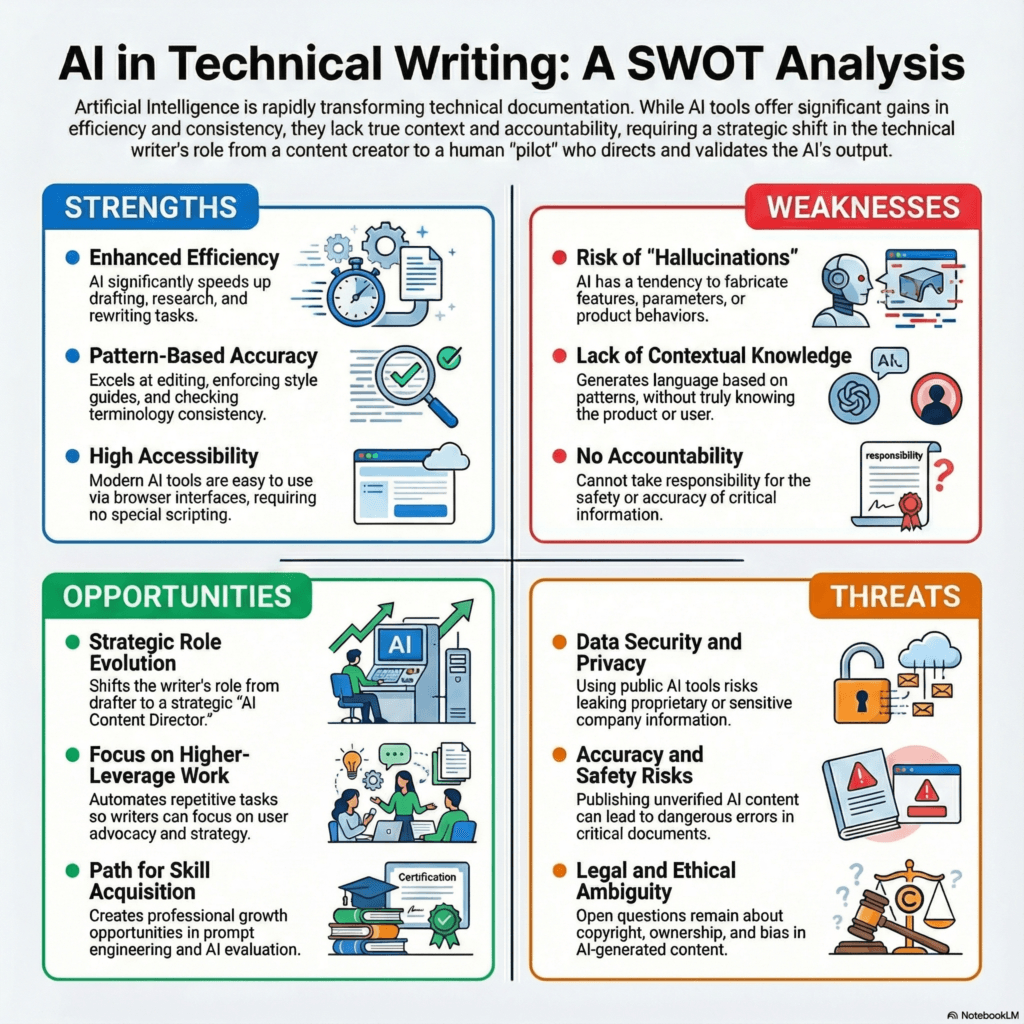
AI in technical writing: SWOT analysis
The following infographic summarizes the overall impact of AI in technical writing using a SWOT (Strengths, Weaknesses, Opportunities, and Threats) analysis. AI presents clear strengths and opportunities for technical writers and the documentation workflow. Weaknesses and threats are non-trivial but can be mitigated easily with sufficient guardrails and policies in place.
Getting started: Low-risk ways to introduce AI
If you’re introducing AI in your team, you do not need a transformation program to begin. Start small, measure outcomes (or improvements), and build from there. Starting with low-risk tasks will:
- Prevent accidental policy violations
- Enable your team to adapt to AI tools comfortably
Start with editing and summaries
Low-risk, high-value tasks:
- Sentence simplification
- Summary generation
- Tone adjustments
Pilot on internal documentation
Internal docs reduce exposure:
- Fewer legal risks
- Faster feedback loops
Create a simple AI usage policy
A basic policy should cover:
- Approved tools
- Allowed content types
- Review requirements
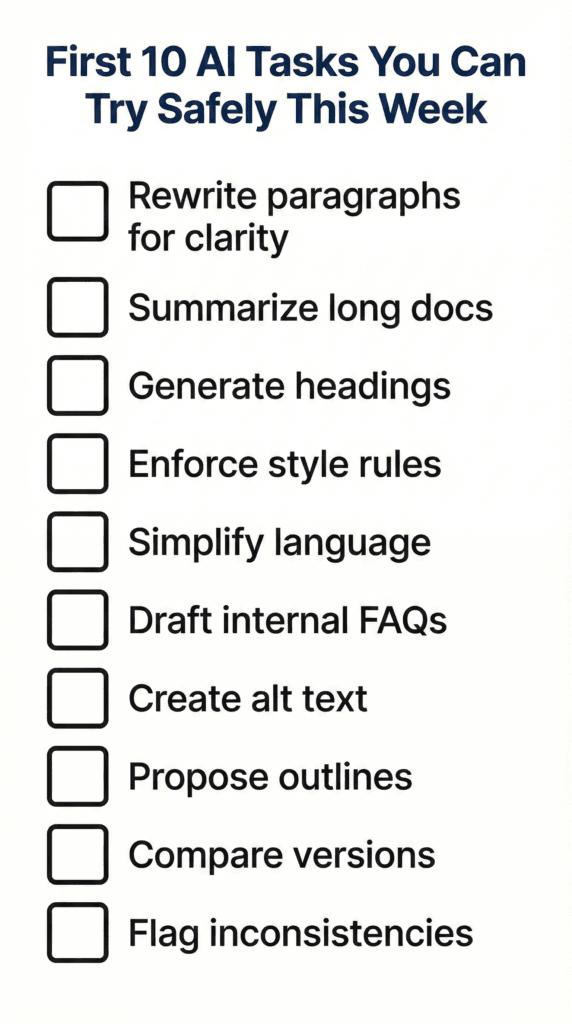
First 10 AI Tasks You Can Try Safely
The following checklist shows 10 low-risk documentation tasks that you can perform using AI. Performing these tasks will help you “dip your toes into the water” and become comfortable with AI tools.
I too used AI to enforce style guides in my writing and measuring compliance. This was back in 2023. So, just making the AI understand the style guide, check compliance reliably, and generate consistent reports taught me a lot about prompt engineering and AI hallucinations.
Career roadmap: Thriving as a technical writer in the age of AI
The most valuable writers are becoming harder to replace, even as the future of technical writing increasingly intersects with AI.
What is unlikely to be replaced soon
- SME collaboration
- Information architecture
- Risk judgment
- User advocacy
AI lacks accountability. You provide it.
Skills to develop over 12–24 months
Focus areas:
- Workflow design
- AI evaluation
- Content strategy
Updating your portfolio and resume
Show:
- Before/after examples
- AI-assisted workflows
- Quality metrics
This positions you as a senior practitioner, not a tool user. If you don’t have a technical writing portfolio, you really must make one. For more information, see Building a technical writing portfolio and What to include in a technical writing portfolio.
Conclusion and key takeaways
AI is not the end of technical writing. It is a forcing function. It pushes writers toward higher-leverage work, better judgment, and clearer thinking. If you take one step this week, try a low risk editing task. Observe what improves, and what does not. Build from there.
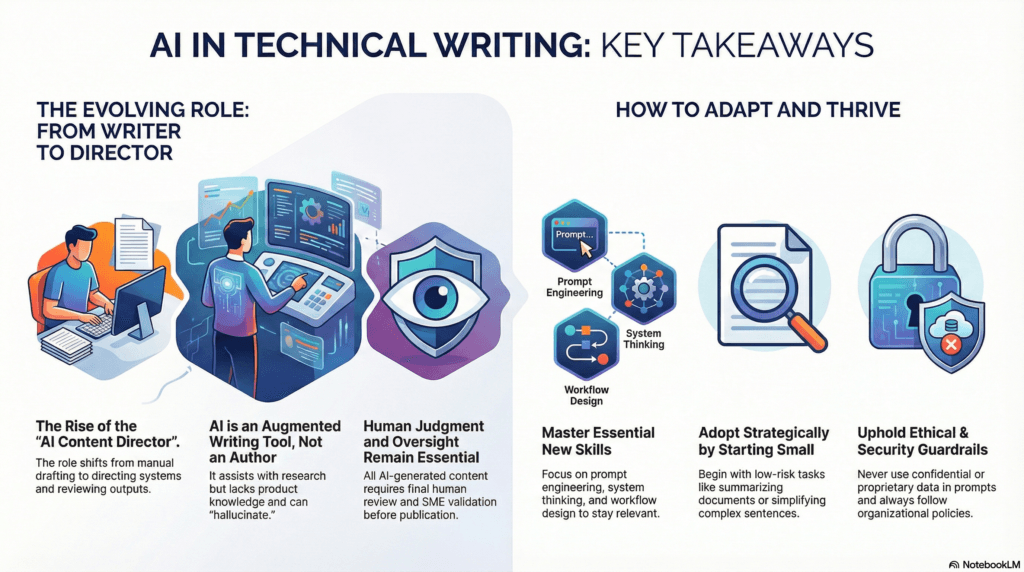
Make a note of the following key takeaways about the role of AI in technical writing:
- AI is augmented writing: Rather than viewing it as automated documentation, AI is best understood as augmented writing. While these tools can generate language based on patterns, they do not possess knowledge of specific products or users, meaning human judgment remains essential.
- An evolutionary role shift: History shows that shifts from manual tools to digital ones—such as moving from typewriters to computers—transform roles without eliminating the need for expertise. AI represents a similar evolution, moving technical writers from manual drafting toward the strategic management of automated systems.
- The rise of the AI content director: The technical writer’s role is shifting toward becoming an AI Content Director, where the focus is on designing workflows and defining quality thresholds. Practitioners will likely spend less time typing sentences and more time directing systems and reviewing outputs.
- Critical human oversight: AI is a powerful research assistant but is not a “source of truth”. Because AI lacks accountability and can hallucinate facts, all content must undergo a final human review and SME validation before it is published.
- Essential new skill sets: To remain relevant and valuable, writers should master prompt engineering, system thinking, and workflow design. Developing these skills over the next 12 to 24 months will help cement a writer’s position as a senior practitioner.
- Full documentation lifecycle support: AI provides value at every stage, from brainstorming edge cases during planning to performing change impact analysis during maintenance. It is particularly effective at “low-risk, high-leverage” tasks like suggesting logical section orders or generating metadata.
- Ethical and security guardrails: Use of AI introduces risks regarding data sensitivity and proprietary information. Writers must adhere to organizational policies, verify that no confidential data is used in prompts, and ensure compliance with legal requirements.
- Strategic adoption through small steps: The most effective way to adapt is to start with low-risk tasks, such as simplifying sentences or summarizing long documents. Starting small prevents policy violations and allows teams to build comfort with the tools before moving to higher-stakes content.
We will continue updating this guide as practices mature. Check back in six months. The tools will change. The fundamentals will not. We have entered a very challenging and exciting, we can either learn to ride the waves or drown.
FAQ: Most common questions about AI in technical writing
Will AI replace technical writers?
No, but it will change how you work. AI handles repetitive drafting and formatting, while you focus on strategy, audience understanding, and quality control. Technical writers who learn to direct and evaluate AI will be more valuable than those who ignore it.
Which AI tool should I learn?
It depends on your goal. ChatGPT (or similar LLMs) is great for brainstorming and quick rewrites, while platforms like Document360 or ClickHelp are better for secure, team-based production workflows. Experiment with free or trial versions before committing to an enterprise tool. However, if you’re employed somewhere, your workplace likely has its list of approved AI tools. So, you can start with those.
Is AI-generated documentation safe to publish?
Only after human review. AI can create false information (hallucinations) that is dangerous in a technical context, especially for code, configuration, and security topics. Always have a subject-matter expert verify facts, examples, and procedures before publishing.
How can I use AI without breaking my style guide?
Feed your style guide directly into the prompt and treat it as non‑negotiable context. For example: “Rewrite this section using our style rules: active voice, no jargon, short sentences, and ‘you’ as the default pronoun.” You can also combine this with tools like Grammarly or built‑in style checkers in your docs platform to keep tone consistent.
How do I learn prompt engineering?
Practice on real tasks. Spend 30 minutes each week trying different instructions with tools like ChatGPT or Claude and compare how the outputs change as you add more context, constraints, and examples. Focus on being specific, providing samples, and iterating on prompts instead of expecting perfection in one shot. Better still, ask your favorite AI to teach you, it does a rather good job of it. Especially tools like ChatGPT.